

The instrument cluster is the driver-facing display behind the steering wheel. It shows the information needed to drive the car, such as speed, warning lights, fuel level or battery charge. The infotainment system is normally the center display used for audio, navigation, phone functions, apps and vehicle settings.
Modern cars can share information between the two screens, but that does not make them the same system. A navigation instruction may appear in the cluster while the route is managed through the infotainment screen. The displays can look like one continuous panel and still perform different jobs.
Infotainment vs. instrument cluster at a glance
| Feature | Instrument cluster | Infotainment system |
|---|---|---|
| Usual location | Directly in front of the driver | Center of the dashboard |
| Main purpose | Driving and vehicle-status information | Media, navigation, communication and settings |
| Typical information | Speed, odometer, range, warning lamps, gear position | Radio, maps, phone, cameras, apps and climate menus |
| Safety role | Displays legally required telltales and urgent warnings | Supports convenience and secondary vehicle functions |
| If it fails | Critical driving information may disappear | Audio, maps, cameras or touchscreen controls may be lost |
What the instrument cluster does
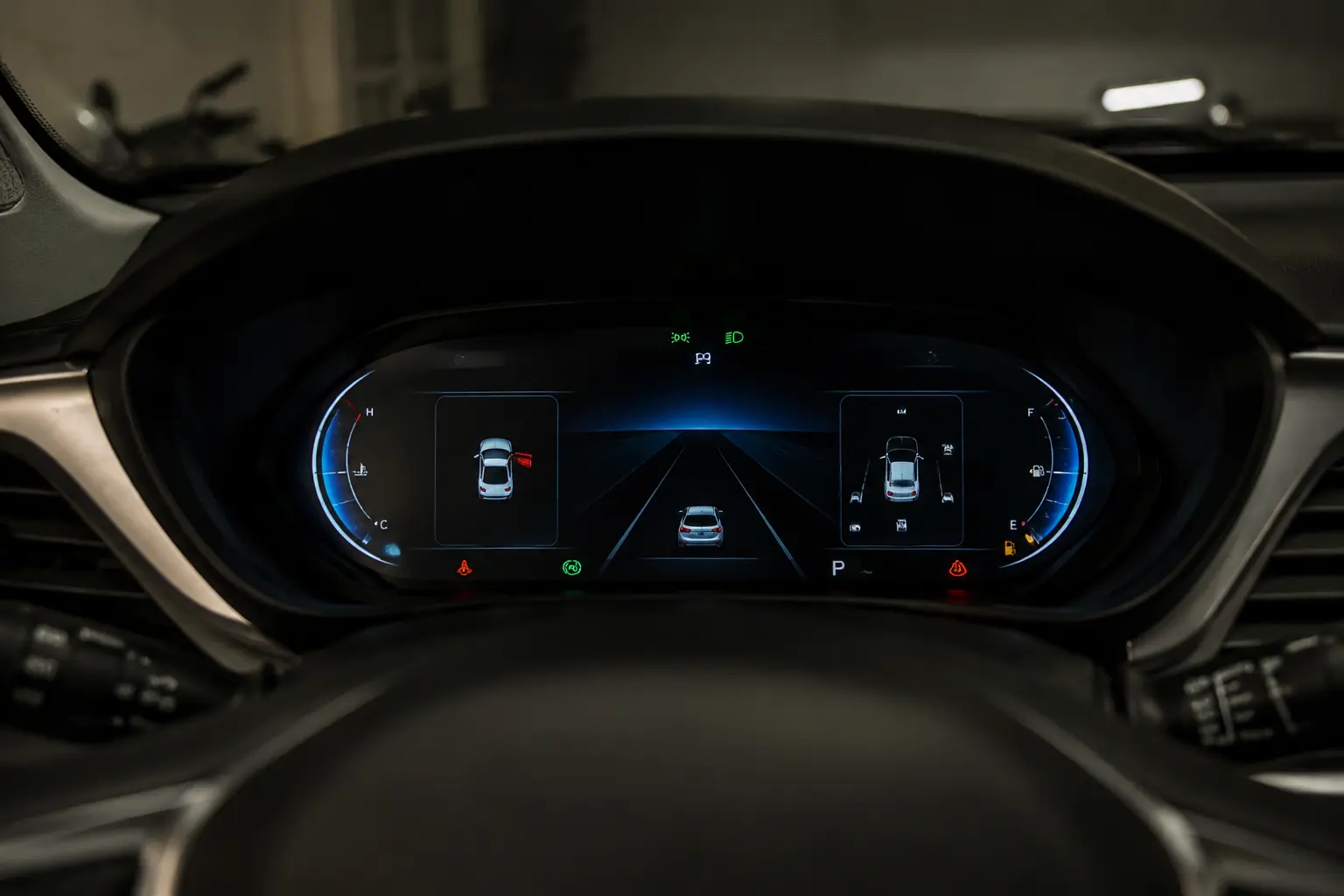
Traditional clusters use physical gauges. Digital clusters replace some or all of those gauges with a screen, but the job remains the same: keep essential information in the driver’s normal line of sight.
Depending on the vehicle, the cluster may show:
- Vehicle speed and engine speed
- Fuel level, battery charge and estimated range
- Odometer and trip information
- Gear position and drive mode
- Turn signals, high-beam status and warning lamps
- Driver-assistance alerts
- Condensed navigation or media information
Names such as digital cockpit, virtual cockpit, driver information display and digital gauge cluster usually describe this part of the dashboard. They do not automatically mean the center touchscreen. Audi’s terminology is a good example; our Audi Virtual Cockpit comparison explains how versions of a digital cluster can differ.
What the infotainment system does

The infotainment system handles the features occupants interact with for information, entertainment and convenience. Its center screen is only the visible part of the system. The head unit, software, amplifier, antennas, USB hardware and connected modules may all be involved.
Common infotainment functions include:
- AM/FM or satellite radio and audio streaming
- Apple CarPlay and Android Auto
- Bluetooth calls and messaging
- Built-in navigation and traffic information
- Backup and surround-view camera images
- Vehicle, sound and connectivity settings
- Climate controls on vehicles that place them on-screen
A frozen center screen therefore does not necessarily mean the instrument cluster has failed. Likewise, a blank cluster does not prove that the infotainment head unit is defective.
Why the two systems can appear connected
Manufacturers increasingly use a shared visual design, connected control modules and a single wide panel. The infotainment system can send a turn instruction or song title to the cluster, while steering-wheel buttons can control information shown on either screen. That is integration, not interchangeability.
The 2026 Ford Bronco illustrates the distinction clearly: Ford shows a 12-inch center display while separately identifying the dashboard’s digital cluster and touchscreen. One screen is centered on driver information; the other is the main interface for connected and entertainment features.
How to identify which system has a problem
Start by noting exactly what is missing. If speed, fuel level or warning lamps disappear but the radio and center display work, the fault is more likely on the cluster side. If the gauges work but CarPlay, audio, maps or the backup-camera image fail, begin with the infotainment system.
There can still be overlap. A low-voltage battery, failed fuse, network communication fault or software problem can affect several modules at once. Before buying a replacement screen, check the owner’s manual for fuse locations, test battery voltage and scan every relevant control module for fault codes. A screen that looks dead may not be the failed component.
What to check when buying a used car
- Start the vehicle from cold and watch both screens complete their startup sequence.
- Confirm that every warning lamp illuminates briefly, then goes out as expected.
- Test steering-wheel controls, audio, Bluetooth, navigation and phone projection.
- Select reverse and verify that the camera image appears without delay or distortion.
- Look for dead pixels, flickering, touch areas that do not respond and random reboots.
- Check whether the odometer is stored and displayed correctly after cluster replacement.
Replacement cost depends on the failed part, programming requirements and the vehicle. A used display may still require coding, component-protection procedures or odometer-related work, so diagnose the failed module before ordering parts.
Sources and scope
This article uses standard automotive definitions and current manufacturer examples. Ford’s current Bronco feature page separately presents the center display, digital cluster and connected technology: 2026 Ford Bronco features. Equipment and screen layouts vary by model year and trim, so the owner’s manual and wiring information for the exact vehicle remain the final references.
Related Guides
Is a Honda Pilot Considered a Standard SUV? Why Classifications Differ
Is 91 Octane Worth It Instead of 87? Check the Fuel Label First
Does the Ford 2.3 EcoBoost Require Premium Fuel?
How to Improve Honda Fit Fuel Economy: 15 Safe Steps