
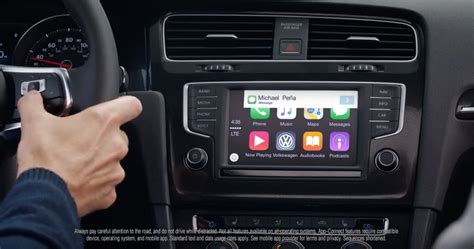
If your Volkswagen already has App-Connect, Apple CarPlay may already be built into the factory infotainment system. Depending on the model year and head unit, it can work through USB or wirelessly. If the car does not have compatible App-Connect hardware or software, there is no single universal VW module that adds CarPlay to every older model.
Check the factory system before buying anything
Open the infotainment menu and look for App-Connect or smartphone integration. Volkswagen uses App-Connect as the umbrella name for Apple CarPlay and Android Auto on compatible vehicles.
If App-Connect is present, try the connection method shown in the owner’s guide. On newer systems, a compatible iPhone can pair wirelessly through Bluetooth and then switch into CarPlay. Other systems require a USB connection.
Older Volkswagens need a head-unit-specific answer
Factory retrofit options depend on the exact infotainment generation. Some cars can support an OEM-style activation or hardware upgrade; others need a replacement head unit or an aftermarket interface.
Before ordering a kit, identify the model year and infotainment unit and confirm that the proposed solution keeps the functions you care about.
- Steering-wheel controls
- Factory microphone
- Backup camera
- Parking-sensor display
- Vehicle settings shown through the factory screen
Wired and wireless CarPlay are not the same thing
A Volkswagen can support CarPlay without supporting it wirelessly. Bluetooth capability by itself is not proof of wireless CarPlay. If the system works only through USB, that may simply be the way that generation was designed.
Related: What TSI means on a Volkswagen Jetta and What SAFELOCK means on a VW.
Sources
- Volkswagen — App-Connect and Apple CarPlay connection instructions
- Volkswagen — Jetta connectivity and App-Connect information
Related Guides
Why Does My Volkswagen Burn So Much Oil? Causes and What to Check
What Does Tiguan Mean? The Volkswagen Name Story
How Big Is a Volkswagen Jetta Trunk? Cargo Space Explained
Is VW 4MOTION the Same as AWD? Yes—Here’s What the Name Means